When working with EventProvider in from namespace System.Diagnostics.Eventing the major role plays property etwProviderId. Because this property is very useful and it can be source of many problem when working with Windows Server AppFabric monitoring, I decided to describe few undocumented facts.
After the monitoring is enabled, AppFabric will slightly change the configuration of the target application. The red marked part of the config in the picture below enables the tracing/eventing/logging of WCF. That means of WCF services and Workflow Services too.
The blue marked part is related for WF-monitoring. It uses different provider and different event destination. The endToEndTracing (WCF staff) ensure that events are finally written in the monitoring database table [ASWcfEventsTable]. However etwTracking element ensures that events are written in the [ASWfEventsTable] of the same database.
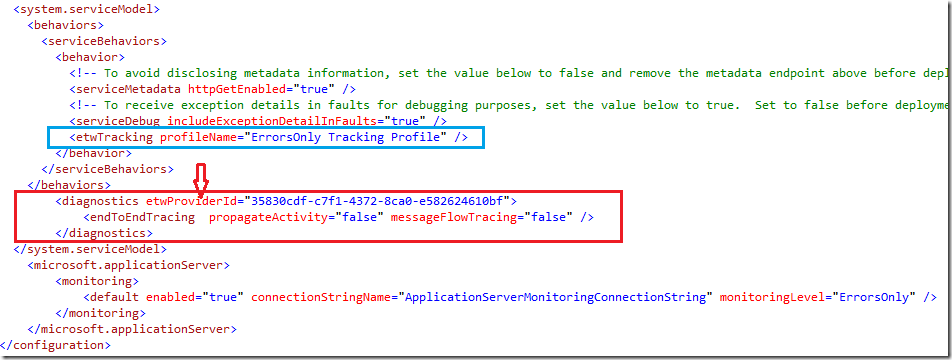
What I want to point out in this post is etwProviderId, which defines who owns the ETW events written by EventProvider. If this value is not set the default value is used : c651f5f6-1c0d-492e-8ae1-b4efd7c9d503.
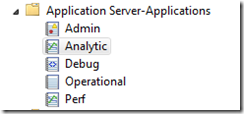
One could ask why this should be important at all. Well, if default value is used events will be invisible to AppFabric ?! However events will not just disappear in nirvana of Windows. Moreover they will be written to default destination which is Analytic Trace which is a windows specific event log.
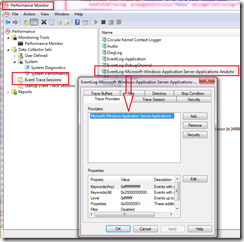
To see that this provider is by default activated start perfmon.exe and navigate as shown at the picture below.
Hope this helps a bit to understand more AppFabric hidden details.
Posted
Jun 06 2010, 05:44 PM
by
Damir Dobric