WCF 4.0 introduces Service Discovery, which I described here. I is interesting that all samples about this feature implements a service in a console application. As you know, service channels in such kind of application are activated explicitly by calling of Host.Open() method. As you also know service channel of the service hosted in IIS is activated when the first message arrives.
This almost unimportant fact might be in some scenarios show stopper. Examples of such scenarios are hosting of relay bindings of .NET Service Bus in IIS and activating of discovery endpoint. Why?
Discovery Feature is used to discover the service for some consumer. This feature is activated when udpDiscoveryEndpoint is activated and that happens when the channel is activated. In IIS context that means, when first message arrives. If consumer of service does not know how to reach the service it cannot send the message. Because no message has arrived, discovery does not work and consumer cannot use discovery client :)
Not bad!?
To make it working enable service auto start in Windows Server AppFabric.
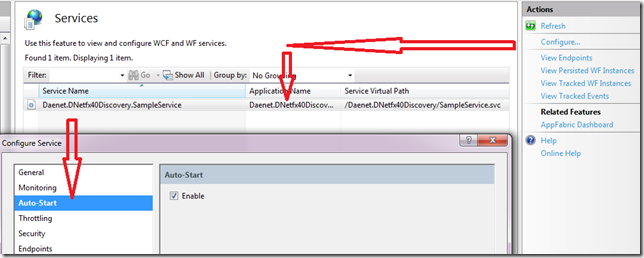
The same can be achieved with following configuration entry:
<configuration>
. . .
<microsoft.applicationServer>
<hosting>
<serviceAutoStart>
<add relativeVirtualPath="SampleService.svc" />
</serviceAutoStart>
</hosting>
</microsoft.applicationServer>
. . .
</configuration>
Posted
Sep 09 2010, 12:18 AM
by
Damir Dobric